
We’ve all “WOW”ed at the Demos at Engage 2022 and now we can try Domino Restyle (in Beta) ourselves.
The deployment here seems slightly unconventional, in that you need to install the latest beta of Nomad Server to get it, but I’m not complaining. The Nomad Web server is just unzipping files to a program directory. Once you have a valid cert, and ID Vault and make sure that NOMAD_WEB_HOST is set it your notes.ini it just starts up.
Once in the Nomad Web Browser client, the restyler is available from File, Application, Restyle.
Two small caveats, obviously you need designer access to the application. And if you try to edit an application that has a master template set it won’t allow you edit.
Anyway, looking forward to playing with this!!
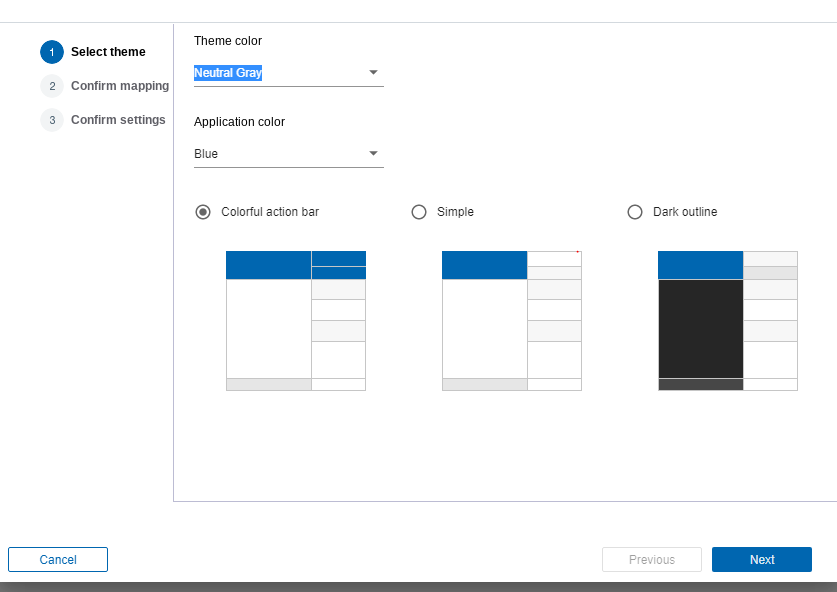
The beta version of Nomad Server(1.0.5 beta), does contain a series of bug fixes too, and note there’s different versions for 12.0.1 (presumably meaning Domino Restyle in production won’t require an upgrade to Danube) and 12.0.2 and it’s hot on the wheels on the latest EAP4 drop. The regularity of releases this summer has been great from HCL.
Cormac McCarthy – Domino People Ltd

Hi Cormac,
could you please provide the version number you see in the “about” info?
I updated my image with the new tgz but I still see
HCL-Nomad-Version: 1.0.4.3276-1835
Hi @Oliver
HCL Nomad version: 1.0.5.3379-1889
I didn’t need to restart my browser, but maybe that and/or opening incognito might help?
Thanks,
Cormac
Hm tried everything, even resetting the app – I guess there was a problem during the image build which was not logged.
Odd! Presume you’ve bounced the Domino server?
I renamed the old “nomad-files” directory to “nomad-files_old” before unzipping the new files. Maybe you could try similar?
I am using the Docker build script so I don’t have to cleanup anything. Anyway, not the most important thing in the world
Version is correct now but I do not see this menu entry. Opened a database and tried to find it. It’s not available for me. I am manager on the db.
@Oliver, I got the same problem, have you been able to resolve it ?
@Siggi
Oliver blogged about his solution – https://oliverbusse.notesx.net/hp.nsf/blogpost.xsp?documentId=2316
It’s currently only available in English. If your browser content language isn’t English you won’t see it.
Thanks,
Cormac
Ooops, i figured it out. Rename the nomad files before installing worked